![Untitled design (2)-3.png]](https://support.helloalleva.com/hs-fs/hubfs/Untitled%20design%20(2)-3.png?height=50&name=Untitled%20design%20(2)-3.png)
NOTE: This is an update to our new Scheduler 2.0, which is being rolled out in segments to all customers. If your organization does not yet have the new scheduler enabled, here's a sneak peek of scheduler functionality coming to you soon!
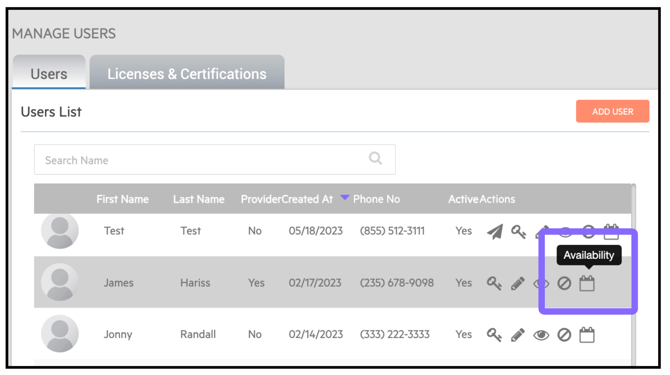
Manage Staff Availability from User Management — Admins can now add, edit, or delete availability for other staff members, right from Company Settings → User Management.
Just click the scheduler icon next to a user's name to set their availability on their behalf. Changes save instantly and sync to that staff member's own availability tab (found in personal settings).
If you experience any issues after the update, clear your cache and cookies and make sure you are using the most up to date version of Google Chrome, the best browser for Alleva.
Alleva Release 8/25/2026 - All release notes are available in our knowledge base in the "What's New" tab.
Learn More Here: Help Center> Alleva University> Cache & Cookies> Google Chrome>