-3.png?height=120&name=Untitled%20design%20(2)-3.png)
How to automatically pre-populate client medications in forms to reduce busywork and improve accuracy.
"Medications" is a new standard component in Forms 3.0. It can be added to any custom form, and when completed for a client, their current medications with dosages and instructions will automatically pre-populate in the form.
TIP: This new feature is useful for Intakes. It allows you to automatically include client medications in any and all of the intakes; biopsychosocial, psychiatric evaluation, nursing assessment, etc.. Just create a form in Forms 3.0 with the medication standard component and add it to the intake via System Settings > Intakes > + Add Section. Click HERE to learn more about placing forms in Intakes.
How to Add Medications to a Form
- Navigate to System Settings > Forms Manager 3.0.
- Click on the form you would like to add medications to, or create a new form.
- On the right hand Component Manager, click "Standard" and select "Medications" to add the medications component into the form.
- Click "Publish Changes" and the form will be updated. It can then be completed in the document manager, intakes, treatment plan reviews, individual notes, discharge planning, or anywhere else it is placed within the EMR. The client's medications will pre-fill wherever this form is placed. To learn about how to place forms in various areas of the EMR, click HERE!
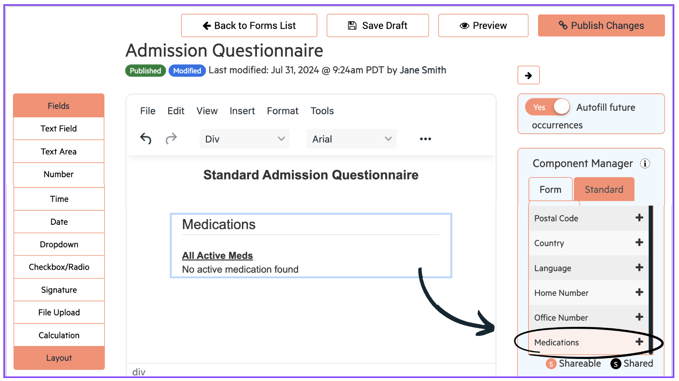
When you complete the form anywhere that it exists in Alleva, the client's current medications will automatically populate like this: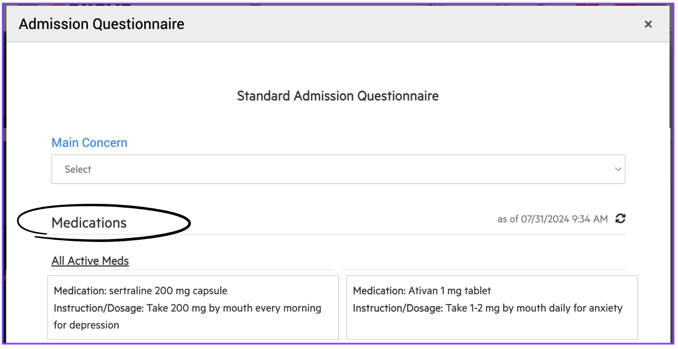
💡💡 Want to learn more about Forms 3.0? Sign in to access a training course in Alleva University by clicking HERE!