![Untitled design (2)-3.png]](https://support.helloalleva.com/hs-fs/hubfs/Untitled%20design%20(2)-3.png?height=50&name=Untitled%20design%20(2)-3.png)
Clinicians can now add additional services to both individual and group session notes to document services provided beyond the originally scheduled session type.
This feature supports more complete clinical documentation and helps ensure that all rendered services are properly reflected in reporting and billing workflows.
What Happens When You Add an Add-On Service
When an add-on service is selected in a note:
- It will appear in ETT for organizations using Alleva Billing.
-
It is included in the finished print view of the note within the Client Notes screen.
-
It appears in the Client Detail Report.
This ensures that any additional services provided during a session are clearly documented and visible for administrative and reporting purposes.
How to Add an Add-On Service to a Note:
-
Open the individual or group session note either from the scheduler or the dashboard.
-
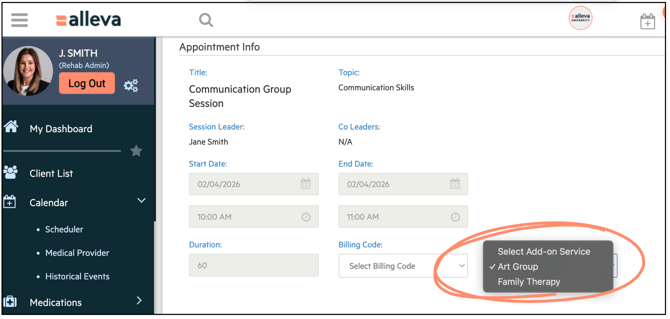
Locate the Add-On Services dropdown.
-
Select the appropriate add-on service from the available list.
-
Complete and sign your note as usual.
The selected add-on service will automatically be included in the final version of the note and related reports.
Admin Setup Required: Before clinicians can use this feature, an administrator must create the available add-on service types.
How to Create Add-On Service Types (For Admin):
-
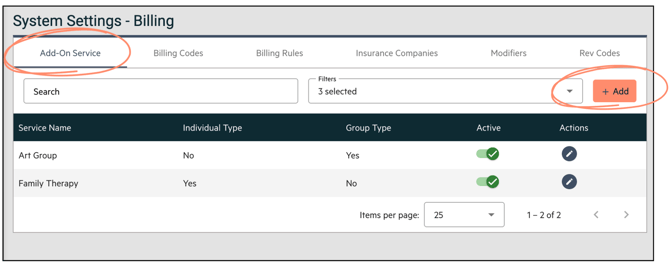
Navigate to: System Settings > Billing > Add-On Service. Click "Add".
-
Enter a Service Name.
-
Select a Session Type:
-
Individual
-
Group
-
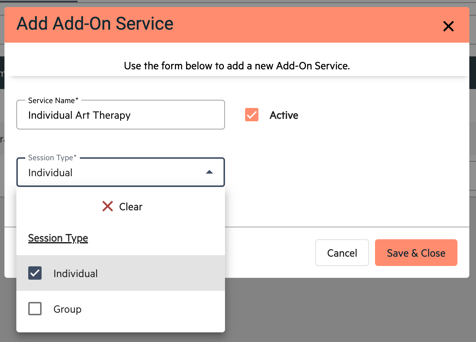
4. Save the new add-on service type.
Once created, these add-on services will be available for selection in the corresponding individual or group notes.
Best Practices for Clinicians
-
Only select add-on services that were actually provided during the session.
-
Ensure your documentation clearly supports any additional services rendered.
-
If you do not see the appropriate add-on service option, contact your system administrator.
Summary
The Add-On Services feature allows you to accurately capture multiple services within a single session note. By documenting these services directly in your note, you improve clarity, reporting accuracy, and overall workflow efficiency.